


MerchFox has two plans for print-on-demand sellers: Seller, which is free, and Priority, a monthly subscription that lowers your base cost on every fulfilled order. You can see your current plan, apply a plan coupon, upgrade, or cancel from the Plan page in your account.
MerchFox Plans at a Glance
Both plans give you the same MerchFox features. The only difference is price.
1. Seller Plan
Cost: $0 / month
Pricing: Pay per order: standard base cost plus shipping.
Best for: New sellers launching their first print-on-demand store or testing product designs.
2. Priority Plan
Cost: $29.99 / month (cancel anytime)
Pricing: Lower base cost on every fulfilled order, plus shipping.
Best for: Growing stores with steady order volume, where the savings on each order add up to more than the monthly fee.
Shipping rates are the same on both plans. Need custom terms for a high-volume business? Contact us about an Enterprise plan.
Is Priority Worth It for You?
The Priority discount is set per product, so you can check it before you upgrade:
Open Catalog in your MerchFox Dashboard and choose a product.
Expand a provider and open Prices by size & shipping.
Compare the Seller and Priority price for each size. On the Seller plan you will also see how many orders a month it takes for Priority to pay for itself on that product.
How to Upgrade to Priority
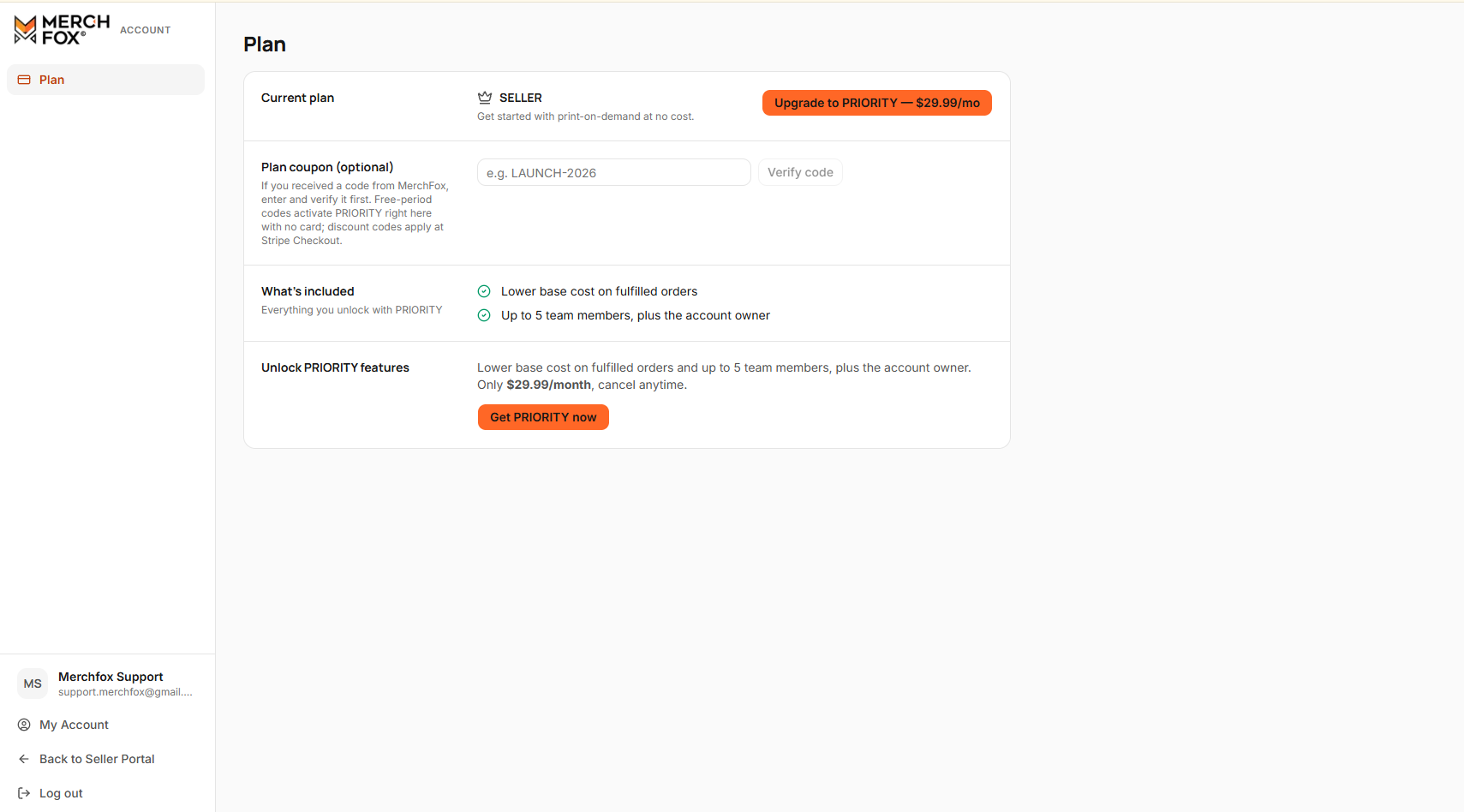
Step 1: Open the Plan Page
Go to account.merchfox.com and sign in with your MerchFox account.
Click Plan in the left sidebar.
Step 2: Apply a Plan Coupon (Optional)
If you have a plan coupon or promotional code:
Find the Plan coupon (optional) section.
Enter your code (for example,
LAUNCH-2026) and click Verify code.A valid code shows what it gives you. The discount is applied when you continue to checkout.
Some coupons give you free months of Priority with no card required. With one of these, the upgrade button changes to Activate PRIORITY free for … and Priority turns on right away, without checkout. When the free period ends, your card on file is charged $29.99/month; if you have no card on file, your account returns to the Seller plan. You can add a card any time with Add payment method.
Step 3: Check Out
Click Upgrade to PRIORITY — $29.99/mo next to your current plan, or Get PRIORITY now further down the page.
You will be redirected to our secure Stripe Checkout page.
Review your plan, enter your payment details, and confirm your subscription.
Once payment is confirmed, your plan shows as PRIORITY with an Active badge, and Priority pricing applies to your orders.
Managing Your Priority Subscription
Update your card: Click Update payment method on the Plan page.
Failed payment: If a renewal charge fails, Priority stays on while we retry, and the Plan page shows a Payment failed badge. Click Pay now to pay the invoice or Update payment method to change your card.
Cancel: Use the Cancel subscription section, then confirm with Yes, cancel. Priority stays on until the end of your current billing period.
Changed your mind? Before the period ends, click Resume subscription to keep Priority.
Frequently Asked Questions
Can I cancel Priority at any time?
Yes. Cancel from the Plan page at account.merchfox.com. You keep Priority until the end of your current billing period. If your renewal payment has failed, cancelling ends Priority right away and cancels the unpaid invoice, so you are not charged for it.
Where do I enter a coupon?
In the Plan coupon (optional) section of the Plan page, before you click the upgrade button.
What happens to my products if I go back to the Seller plan?
Your products, stores, and orders stay as they are. New orders are priced at Seller plan prices.
Does Priority change shipping costs?
No. Shipping rates are the same on every plan.
Need help with billing or plan changes?
Contact our support team at [email protected] or click Support in the left sidebar of your dashboard.
Was this article helpful?
Let us know so we can continue improving our help center.