


Last Updated: September 8 2026
Overview
Connecting your eBay store to MerchFox allows us to automatically import your orders, sync tracking numbers back to eBay, and (optionally) manage your product listings — so you can focus on selling while we handle fulfillment.
What this integration does:
✅ Automatically imports new eBay orders into your MerchFox dashboard
✅ Pushes shipment tracking numbers back to eBay once your order ships
✅ Syncs product listings and inventory (optional, if you use MerchFox listing tools)
✅ Keeps order statuses updated in near real-time
What this integration does NOT do:
❌ We never message your buyers
❌ We never change your prices, promotions, or store settings without your action
❌ We never use your buyers' data for marketing, advertising, or resale
Estimated setup time: 3–5 minutes.
Prerequisites
Before you begin, make sure you have:
An active MerchFox account — Sign up here if you don't have one
An active eBay seller account in good standing
Admin access to both accounts (you'll be asked to log in to eBay during setup)
Step 1: Open the Integrations page
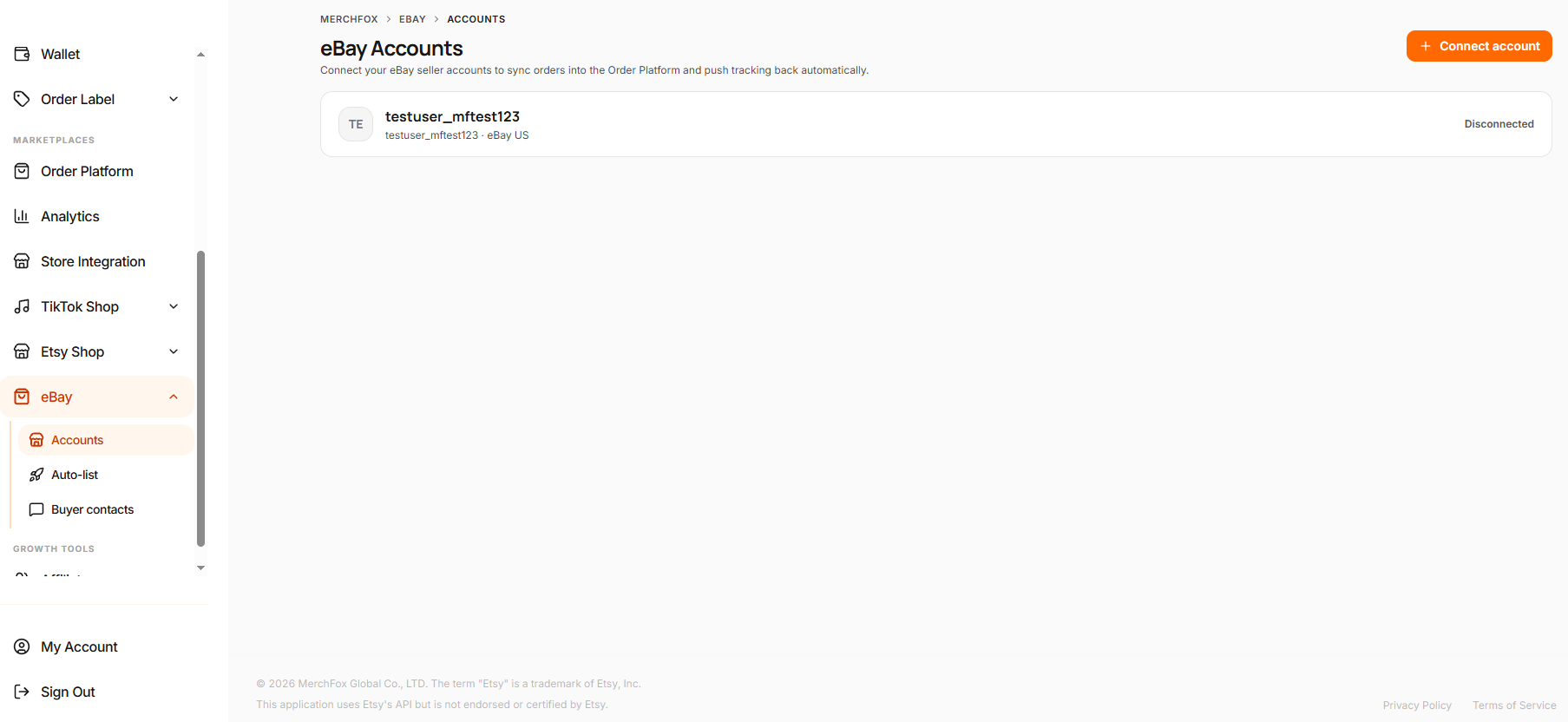
Log in to your MerchFox dashboard and go to:
Ebay → eBay Accounts → Connect account
Step 2: Select eBay
From the list of available sales channels, click the eBay card, then click Connect eBay Store.
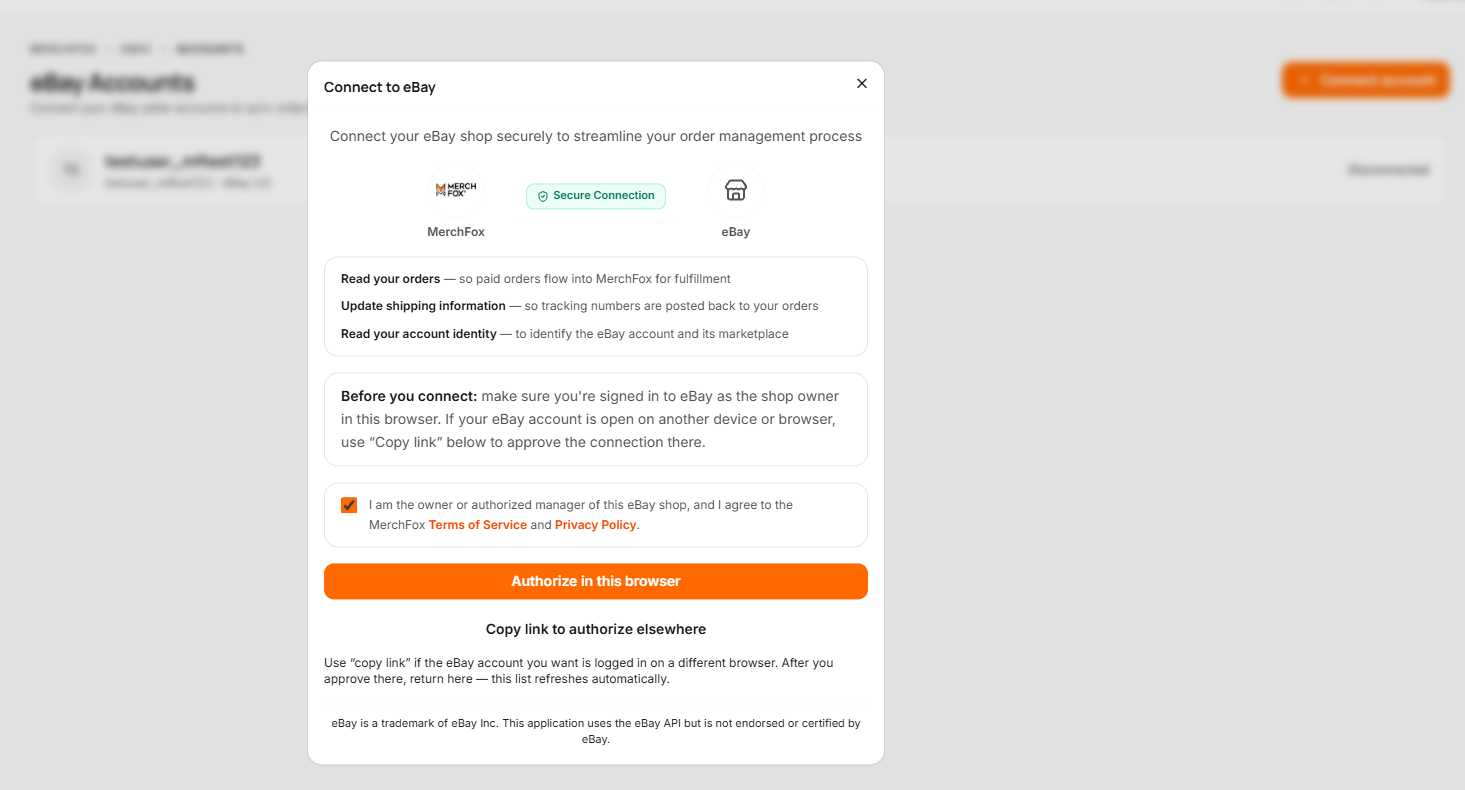
Step 3: Sign in to eBay and grant access
You will be redirected to eBay's official login page (ebay.com). This is normal and secure — MerchFox never sees or stores your eBay password.
Sign in with your eBay seller account credentials.
eBay will display a consent screen listing the permissions MerchFox is requesting:
View and manage your orders — so we can import orders and update fulfillment status
View and manage your inventory and listings — so we can sync stock and (optionally) publish listings
View your selling account settings — so we can read your shipping/return policies for accurate fulfillment
Review the permissions and click Agree / Grant Access.
🔒 Your data, your control. MerchFox only requests the minimum permissions needed for fulfillment, in line with the [eBay API License Agreement] and our Privacy Policy. You can revoke access at any time (see "How to disconnect" below).
Step 4: Confirm the connection
After granting access, you'll be redirected back to MerchFox. You should see your eBay store listed under Store Connections with a green Connected status.
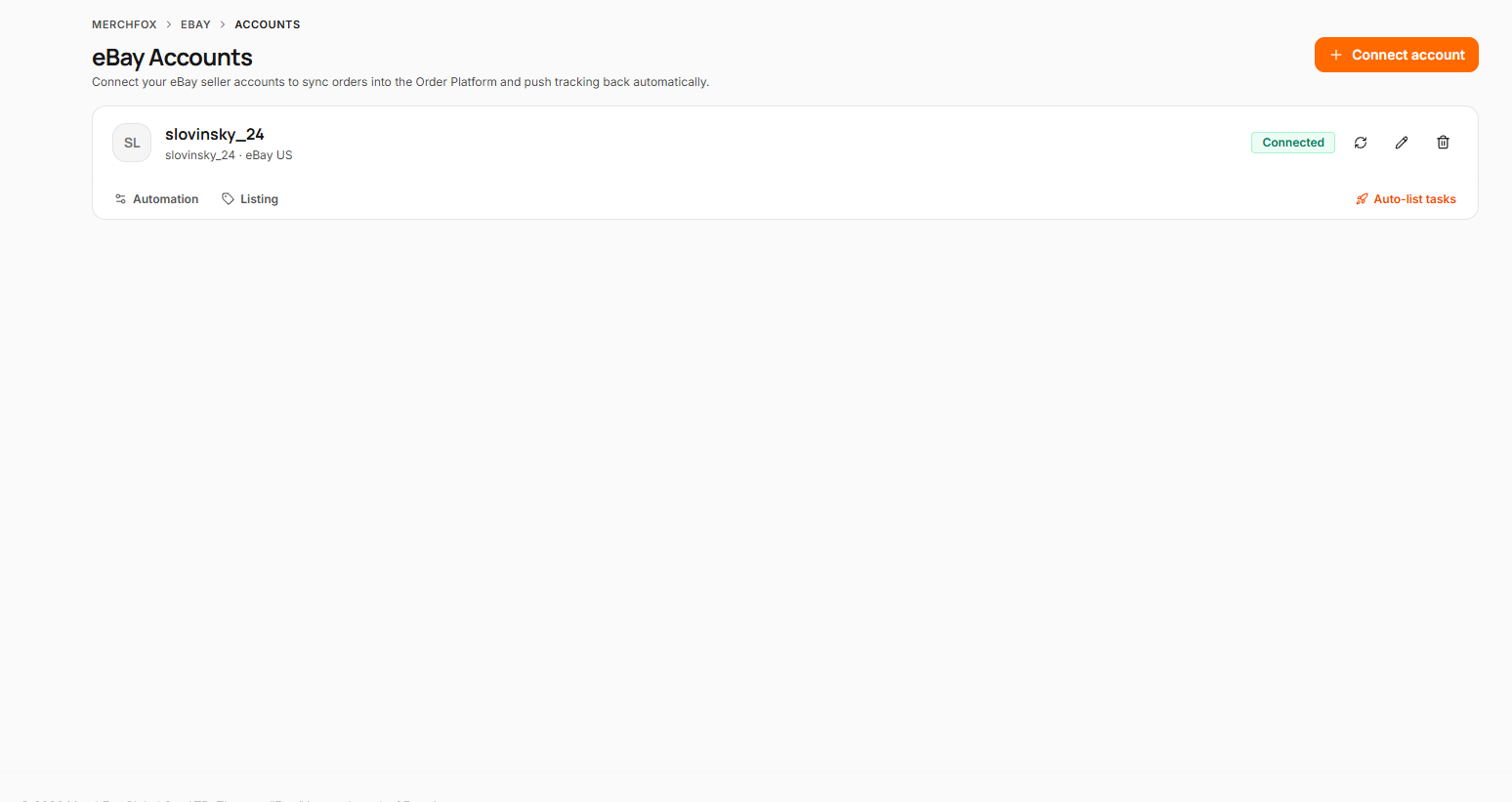
MerchFox will now begin importing your recent open orders. The first sync may take a few minutes depending on your order volume.
Step 5: Configure your fulfillment settings (recommended)
After connecting, your account appears on the eBay → Accounts page. Each account has two settings tabs:
⚙️ Automation tab — controls how orders and tracking flow:
Auto fulfillment push - Pushes new Order Platform orders straight to MerchFox fulfillment. Orders with unlinked products wait for a manual push.
Auto tracking push - Sends fulfillment tracking numbers back to eBay — this marks the order as shipped and notifies the buyer automatically.
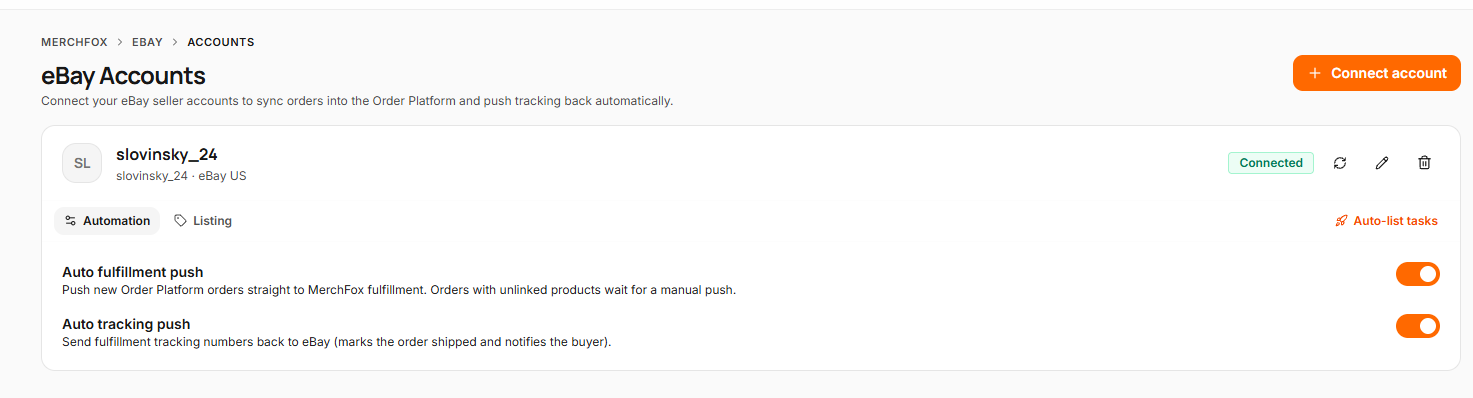
💡 Tip: keep both toggles ON for fully hands-off fulfillment. Turn Auto fulfillment push OFF only if you want to review every order manually before it goes to production.
🏷️ Listing tab — only needed if you plan to use MerchFox auto-listing:
Readiness banner — shows whether this account is ready for auto-listing, along with your current eBay selling limit (number of items and USD value per month). New eBay accounts start with low limits that increase over time; MerchFox automatically pauses listing tasks when your limit is reached.
Business policies — select your Fulfillment policy (shipping services and handling time), Payment policy (how buyers pay), and Return policy (returns window and who pays). These are your own eBay business policies; if the dropdowns are empty, create them first in eBay Seller Hub under Account Settings → Business Policies.
Ship-from address — eBay requires an inventory location for every listing. MerchFox creates it once as "merchfox-default" from the address you enter here. Fill in Address, City, State, ZIP, and Country, then click Save listing settings.
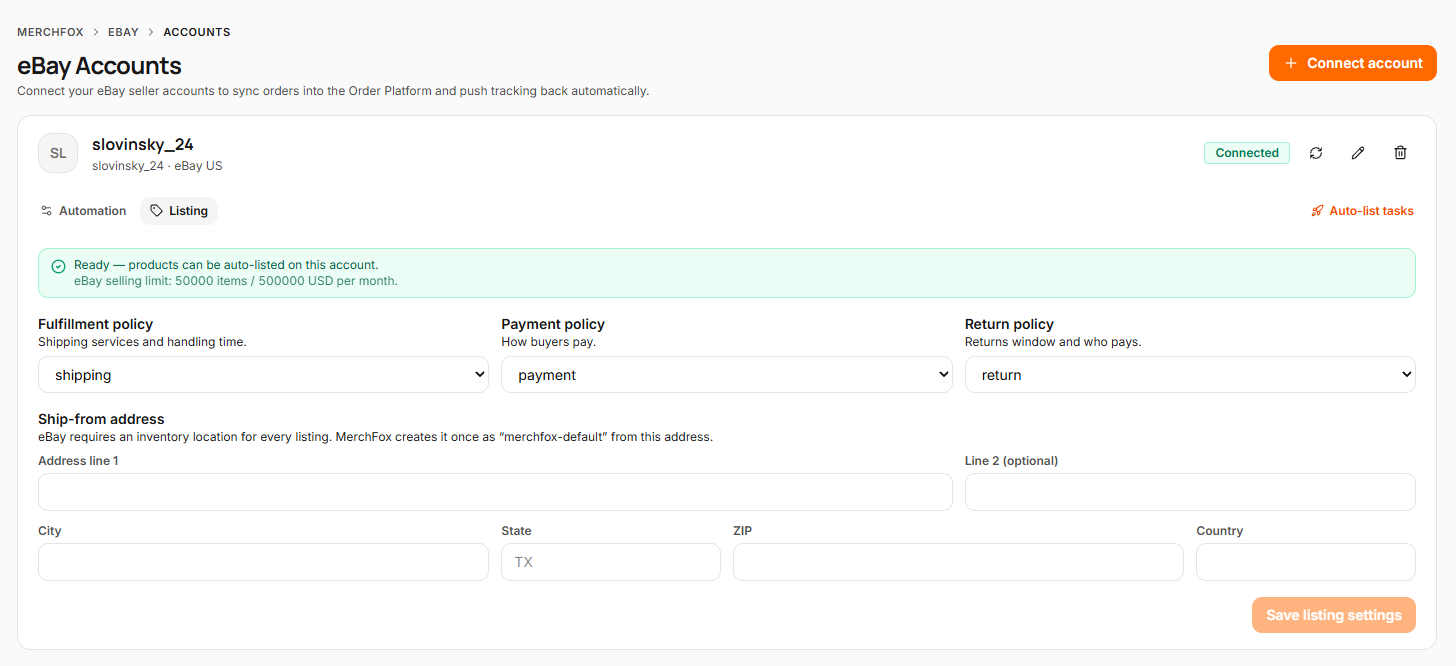
You can revisit these settings anytime from eBay → Accounts. The Auto-list tasks link on each account takes you to your listing queue.
How to disconnect your eBay store
You are always in control of the connection. There are two ways to disconnect:
Option A — From MerchFox (recommended):
Go to Ebay → eBay Accounts
Find your eBay store and click ⋮ → Disconnect
Confirm. MerchFox immediately stops retrieving new data from your eBay account.

Option B — From eBay:
Sign in to eBay → Account Settings → Sign in and security → Third-party app access (or visit your eBay account's application permissions page)
Find MerchFox in the list and click Revoke access
What happens to your data after disconnecting? Orders already in production will still be fulfilled. Previously imported data is retained and deleted according to the retention timelines in our Privacy Policy. You can request earlier deletion at [email protected].
Troubleshooting
"Connection failed" or redirected with an error
Make sure you're logging in with an eBay seller account, not a buyer-only account.
Clear your browser cache or try an incognito window, then repeat from Step 1.
If you manage multiple eBay accounts, confirm you're signed in to the correct one before clicking Connect.
My orders aren't importing
Check that the order status on eBay is Paid / Awaiting shipment — unpaid orders are not imported.
Verify your product mapping: unmapped SKUs may be held in the "Needs mapping" queue depending on your import rules.
Tracking isn't appearing on eBay
Tracking is pushed within 10 minutes of the shipping label being generated. If it's been longer, check Orders → [order] → Activity log for sync errors, or contact support.
"Token expired / Reconnect required" banner
eBay access tokens periodically expire for security. Click Reconnect and repeat Steps 3–4. Your settings and mappings are preserved.
Still stuck? Contact us at merchfox.com/helpdesk — include your store name and an order ID if relevant.
FAQ
Does MerchFox see my eBay password?
No. Authentication happens entirely on eBay's website using OAuth 2.0. We only receive a secure access token that you can revoke at any time.
What buyer data does MerchFox access?
Only what's needed to fulfill orders: recipient name, shipping address, phone number (for carrier requirements), and the items ordered. We never use this data for marketing and never sell it. See our Privacy Policy, Section 5.
Can I connect multiple eBay stores?
Yes — repeat the steps above for each store.
Which eBay marketplaces are supported?
eBay US
Is MerchFox affiliated with eBay?
The MerchFox eBay integration is provided solely by MerchFox Global Co., LTD. eBay Inc. is not the application developer and makes no warranties regarding this application. eBay is a trademark of eBay Inc.
Was this article helpful?
Let us know so we can continue improving our help center.